Employee Document Expiry Tracking
Every visa, ID, passport and permit date for your whole team on one screen, with a reminder to HR 60, 30 and 7 days before anything lapses.
30-day free trial · No credit card required · Flat from $20/month
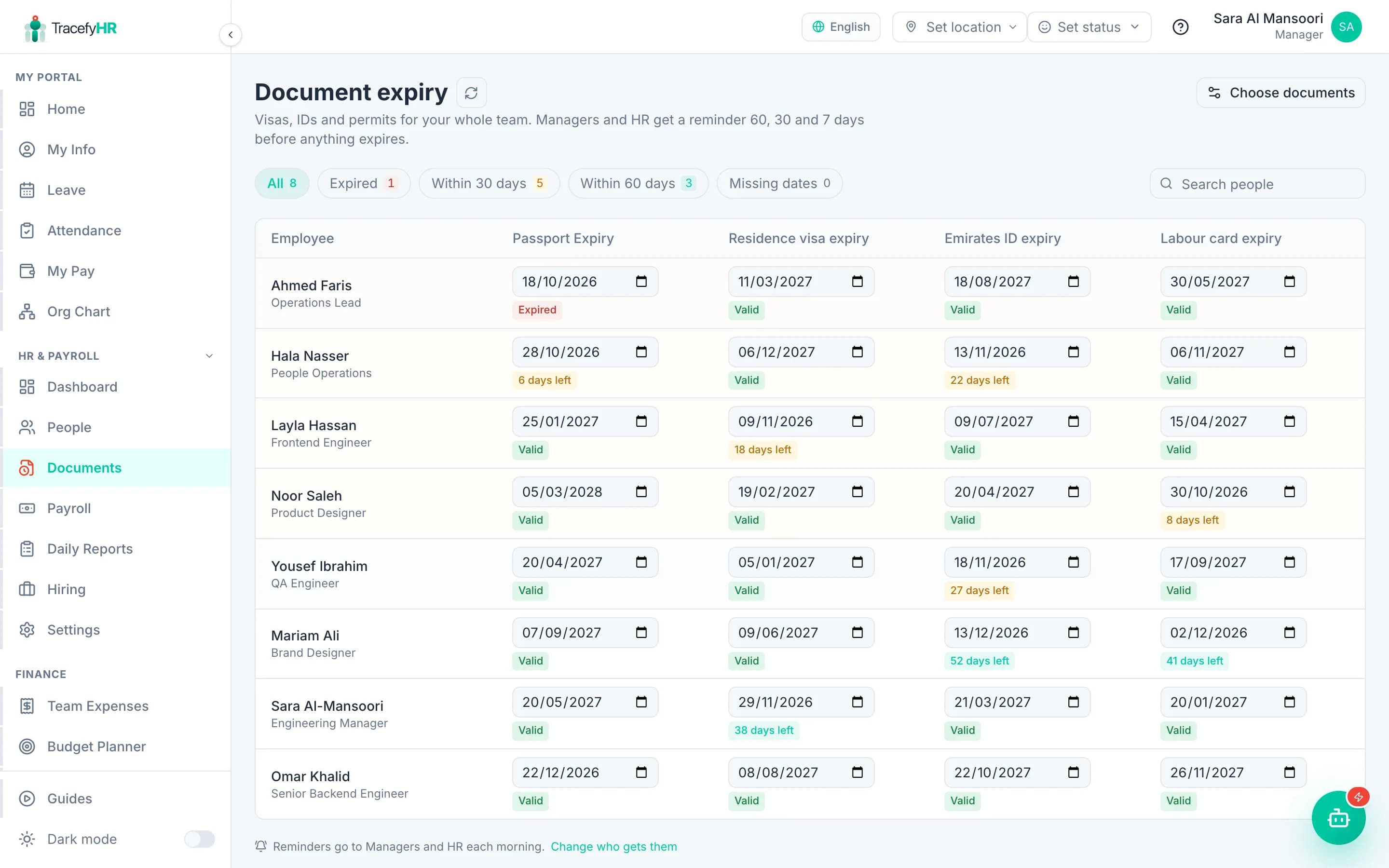
An expired residence visa or labour card is rarely a surprise. It is a date that sat in a spreadsheet, a passport scan or someone's calendar until it had already passed. Then come the fines, the paperwork and an employee who cannot legally work until it is fixed.
TracefyHR keeps those dates on one screen. Pick the documents you renew, type in each person's expiry dates once, and every morning TracefyHR checks them. When a document is 60, 30 or 7 days from expiring, or has expired, your Managers and HR get one short digest in the app and by email, so there is time to start the renewal.
It is built for the work you already do: it tracks dates and reminds you. It does not renew documents or connect to government portals, and the scans themselves stay on each employee's Documents tab.
What document expiry tracking does
Every date on one screen
A grid of people and documents. Filter by expired, due within 30 or 60 days, or missing dates, and edit any date in place.
Reminders before it is urgent
One daily digest to Managers and HR, in the app and by email, when a document reaches 60, 30 or 7 days or expires. Each reminder is sent once.
Suggestions for your country
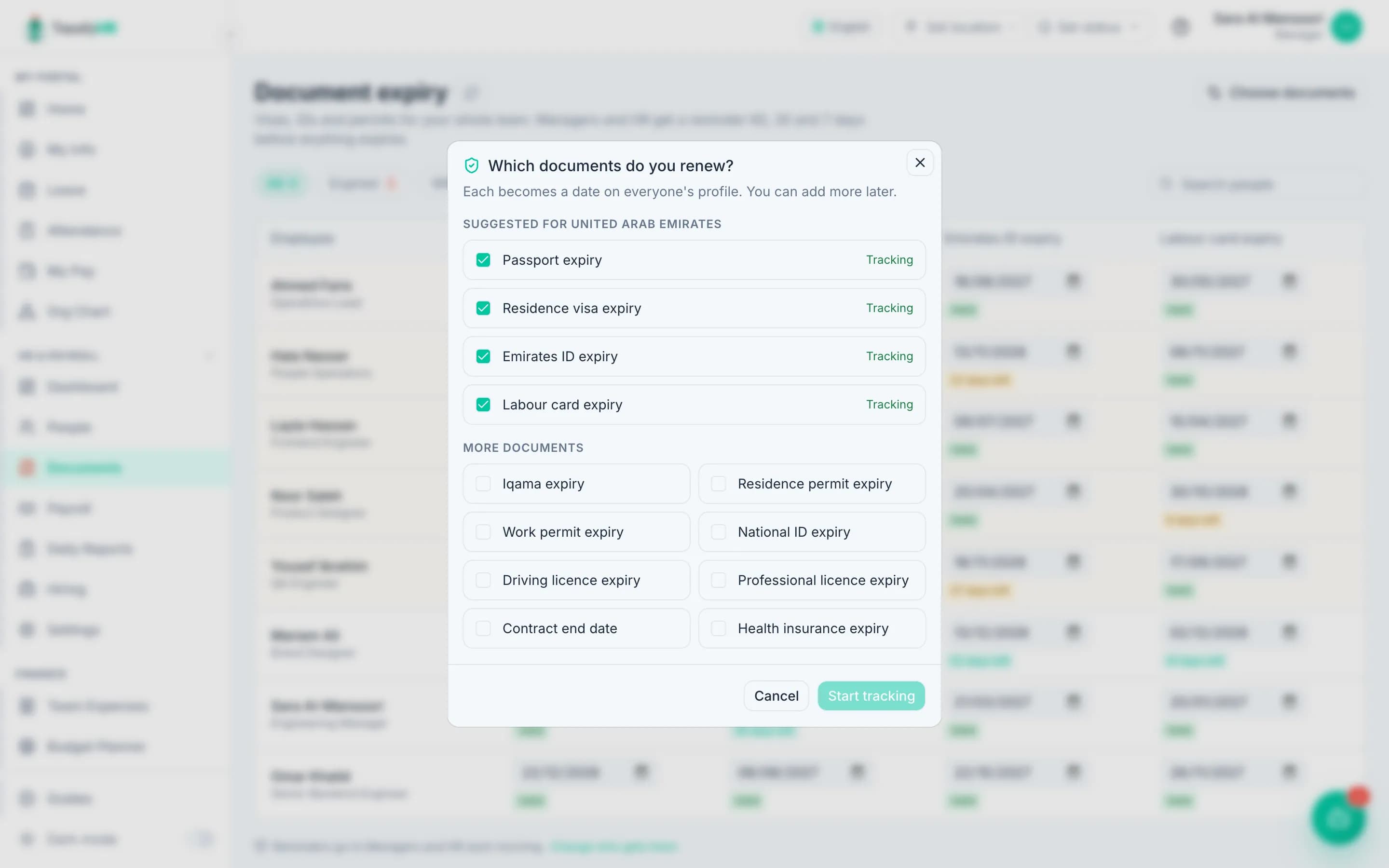
UAE companies start with passport, residence visa, Emirates ID and labour card; Saudi companies with Iqama. Add work permits, licences, contracts or health insurance with a tick.
Any date can be tracked
Turn on "Remind before it expires" for any custom date field in Settings, such as a medical card or a safety certificate.
On every profile
Each employee's profile shows the date with an Expired or days-left label, so it is visible wherever you look.
Renew and move on
Update the date after a renewal and reminders stop. The new date is checked again as it gets close.
How it works
- 1
Choose your documents
Open Documents and click Start tracking. Your country's usual documents are already ticked, so this is one click.
- 2
Add the dates
Type each person's expiry dates straight into the grid and save them together, or fill them in on the employee's profile.
- 3
Get reminded
TracefyHR checks every morning and sends Managers and HR one digest when something needs attention.
- 4
Renew and update
After a renewal, change the date. The reminders for that document stop until the new date gets close.
Included in every plan
Document expiry tracking comes with every TracefyHR plan, alongside payroll, leave and attendance. There is no add-on and no fee per document or per employee: Starter is $20 a month for up to 15 employees.
Starter
$20/mo
Up to 15 employees
Professional
$49/mo
Up to 50 employees
Business
$99/mo
Up to 150 employees
Enterprise
From $199/mo
150+ employees, SSO, SLA
Annual billing saves 20%. Outgrow a plan and you move up to the next one; there is never a per-employee fee. AI features run on pay-as-you-go credits. Full pricing
A good fit if you
- Employ people on visas or work permits, for example in the UAE or Saudi Arabia
- Track licences or certificates that must stay valid for staff to work
- Keep renewal dates in a spreadsheet or a calendar today
- Want HR reminded automatically instead of checking a list
What it does not do
- It does not renew documents or connect to government portals such as ICP, GDRFA, MOHRE or Qiwa
- Reminders go to Managers and HR; employees are not emailed
- It tracks dates, not files: upload the document scan on the employee's Documents tab
Document expiry tracking FAQ
Which documents can I track?
Passport, residence visa, Emirates ID, labour card, Iqama, residence permit, work permit, national ID, driving licence, professional licence, contract end date and health insurance are ready to switch on. Any other date field you add to employee profiles can be tracked too.
When are reminders sent?
Every morning TracefyHR checks all tracked dates. When a document is 60, 30 or 7 days from expiring, or has expired, Managers and HR get one digest in the app and by email. Each stage is sent once per date.
Who gets the reminders?
Every active Manager and HR user by default. You can pick specific people, or turn the reminders off, in Settings → Notifications.
What happens after a document is renewed?
Update the date. Reminders for the old date stop, and the new date is checked again as it gets close.
Can I enter dates for the whole team at once?
Yes. The Documents screen shows everyone in one grid: type the dates in and save them together. You can also edit them on each employee's profile.
How much does it cost?
It is included in every plan, from $20 a month for up to 15 employees, with a 30-day free trial and no credit card needed.
Start tracking expiry dates today
Set up in about 15 minutes. Import your team from Excel, and your 30-day trial starts without a credit card.